

Latest Version
Visit PageMore About :game
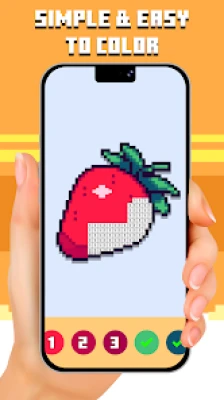
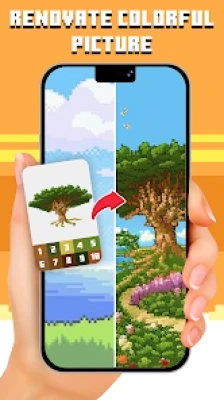
Pixel Paint: Color By Number is a calming and creative mobile coloring game designed to help players relax while expressing their artistic side. Using a simple tap-to-color mechanic, players can transform pixelated images into vibrant masterpieces.
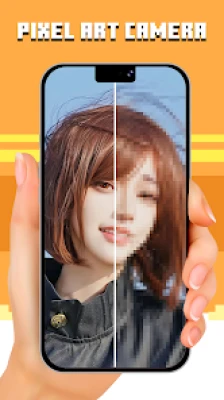
The game features a diverse collection of artwork inspired by cultures around the world, along with the ability to import personal photos and turn them into pixel art. Its intuitive design makes it accessible for beginners while still engaging for experienced users.
With anti-stress benefits and a strong community-sharing aspect, Pixel Paint offers more than just gameplay—it delivers a creative escape and a therapeutic experience.
⭐ Features
- 🎨 Large library of pixel art images
- 📸 Import your own photos to color
- 🧠 Relaxing anti-stress gameplay
- 🌍 Diverse global art themes
- 🤝 Community sharing features
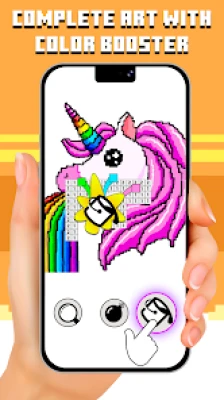
- 🧰 Multiple painting tools
- 📱 Simple and user-friendly interface
🧑🎨 Characters
This game doesn’t include traditional characters, but features themed artwork such as:
- Animals
- Cultural designs
- Fantasy pixel art
- Portraits and custom images
🧰 Weapons / Items
- 🎯 Hint tools for hidden pixels
- 🔍 Zoom for detailed coloring
- 🎨 Color palette system
- 📸 Image import tool (custom artwork)
🎮 How to Play
- Select a pixel image
- Match numbers with colors
- Tap to fill each pixel block
- Complete the artwork
- Share your finished design
🏆 How to Win (Strategy)
- Complete images efficiently
- Focus on one color at a time
- Use tools strategically
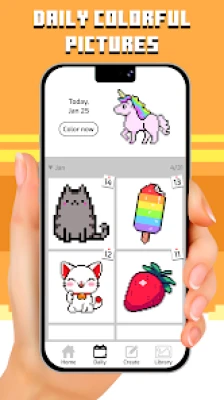
- Finish daily artworks for consistency
💡 Tips & Tricks
- Start with larger sections first
- Zoom in for accuracy
- Save hints for tricky areas
- Take breaks to avoid mistakes
🧑🎓 Beginner’s Guide
- Choose simple images first
- Learn color-number matching
- Practice precision tapping
- Avoid rushing through artwork
🧠 Advanced Pro Strategy
- Optimize coloring flow by grouping numbers
- Minimize tool usage for efficiency
- Complete complex designs faster with pattern recognition
- Import custom images for advanced creativity
🏅 Trophy & Achievement Guide
- 🎯 First artwork completed
- 🎨 Multiple images finished
- 📅 Daily activity streaks
- 🌟 Full artwork collections
🧑🤝🧑 Players Experience
Players enjoy the relaxing nature and creative freedom. However, some users report frequent ads affecting gameplay experience.
✅ Pros & Cons
✔️ Pros
- Easy and relaxing gameplay
- Custom image import feature
- Large variety of art styles
- Suitable for all ages
❌ Cons
- Frequent ads reported by users
- Progress interruptions in some cases
- Limited challenge for advanced players
⚙️ Tech Details
- Developer: ABI Games Studio
- Genre: Casual / Puzzle / Art
- Mode: Single-player
- Size: ~130MB
- Monetization: Ads + In-app purchases
💻 System Requirements
- Android 7.0 or higher
- Stable internet connection
- ~130MB storage space
🎮 Game Modes Overview
- 🎨 Free Coloring Mode
- 📸 Custom Image Mode
- 🌐 Community Sharing Mode
🔄 Updates & What's New
- API updates and performance improvements
- Bug fixes and stability enhancements
- Regular content updates
⚖️ Comparison Section
| Feature | Pixel Paint | Typical Coloring Apps |
|---|---|---|
| Custom Image Import | ✅ Yes | ❌ Limited |
| Relaxation Level | ⭐⭐⭐⭐⭐ | ⭐⭐⭐⭐ |
| Content Variety | ⭐⭐⭐⭐ | ⭐⭐⭐⭐⭐ |
| Ads Frequency | High | Medium |
🌟 User Ratings & Social Proof
- ⭐ ~4.0–4.3 average rating
- 📥 1M+ downloads
- 👍 Popular among casual and relaxation gamers
🤔 Is It Worth Playing? Honest Verdict
Yes—Pixel Paint is worth playing if you’re looking for a stress-relief, casual coloring experience. While ads can be annoying, the creative freedom and relaxing gameplay make it a solid choice.
🆚 Competitor Games
- Pixel Art – Color by Number
- Happy Color – Paint by Number
- Tap Color – Color by Number
🎮 Similar Games
- Sandbox Coloring
- Paint by Number Apps
- Pixel Coloring Games
❓ FAQ
Q1: Is Pixel Paint free to play?
Yes, it is free with optional in-app purchases.
Q2: Can I import my own images?
Yes, the game allows custom image imports.
Q3: Is it offline?
Some features may require internet, but basic play can work offline.
Q4: Is it suitable for kids?
Yes, it’s family-friendly and easy to use.
Rate the Game
User Reviews









Popular Games



















 Android
 iOS
iOS Windows
 Xbox
Xbox